Paper
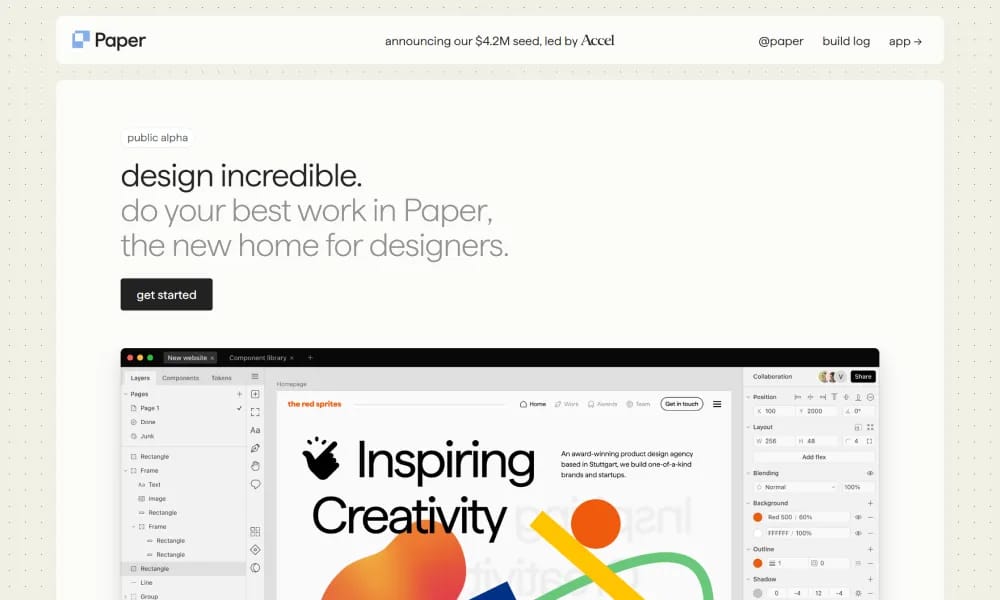
Modern powerful canvas tool empowering designers to create, share, and ship beautiful work.
Product Overview
Details and main features: Paper.design is an emerging AI-augmented design tool positioned as a powerful infinite canvas for designers facing fast-evolving challenges, blending best practices from legacy tools with cutting-edge AI; focuses on keeping designers in control while accelerating idea-to-result workflows; ideal for UI/UX designers, product teams, and creative pros to build visuals, interfaces, animated shaders, and more; emphasizes performance, reliability, and creative freedom, available in browser, desktop, and offline modes. Main features AI enhancements: AI pencil tool (guide AI via voice/text/simple drawings for generation/editing), AI image generation & prompt-based editing, background removal, one-click palette extraction, new AI models. Design canvas: Infinite dynamic canvas, familiar UI, real React/Tailwind code foundation, brush/gradient/shape/text/frame tools. Code & export: Copy as full-fidelity React components, production-ready clean code exports, shader animations. Collaboration & sharing: Multiplayer editing, branching, comments, reimagined sharing. Other: Import GitHub/npm components, real CSS/Flex layouts, optimized image generation flows.
Best For
UI/UX designers and product teams who want an AI-augmented design tool that combines freeform ideation with precise vector editing and real-time collaboration.
Key Features
- Infinite canvas with vector-based drawing tools supporting freehand sketching, shapes, connectors, and text annotations
- AI-assisted design generation that creates layouts, color palettes, and icon sets from natural language descriptions
- Real-time collaboration with multiplayer cursors, comment threads, and version history for team design projects
- Smart components system that maintains design consistency with auto-updating symbols, styles, and shared libraries
- Export to multiple formats including SVG, PNG, PDF, and design system tokens for developer handoff
- Plugin ecosystem supporting community extensions for icon libraries, accessibility checkers, and AI image generation
Pros
- +Combines the freeform feel of whiteboarding with the precision of vector design tools in a single canvas
- +AI features are genuinely useful for ideation without taking control away from the designer's creative process
- +Real-time collaboration performs smoothly even with multiple users on complex canvases with hundreds of elements
Cons
- -As a newer entrant, the community plugin library is significantly smaller than established tools like Figma
- -Advanced prototyping and interactive animation capabilities are still maturing compared to dedicated prototyping tools
/// SPECS
- Pricing:ProFree
- Platform:Browser
- Free tier available, premium features paid

Relume
AI-powered tool for faster website design and building with Webflow and Figma.
Linearity
Vector graphic design and animation tool for marketing teams.

Magic Eraser
Free online AI tool for removing objects from images.

Photiu
AI-powered online tool for image background removal and object erasure.

pixelbin
AI-powered platform for image optimization, transformation, and digital asset management.

CapCut
ByteDance AI video editor for creating pro TikTok/YouTube shorts easily.
EchoWave
Free online audio-to-video editor adding waveforms & subtitles for social sharing.

Veed
Online AI video editor for fast professional creation and subtitles.

Tempo
An AI-powered platform for building React apps 10x faster using a visual code editor.

AutoAE
AI motion graphic designer for creating viral animations and hooks instantly.