Vibe Design Tips
999 small design details that make software feel made
Product Overview
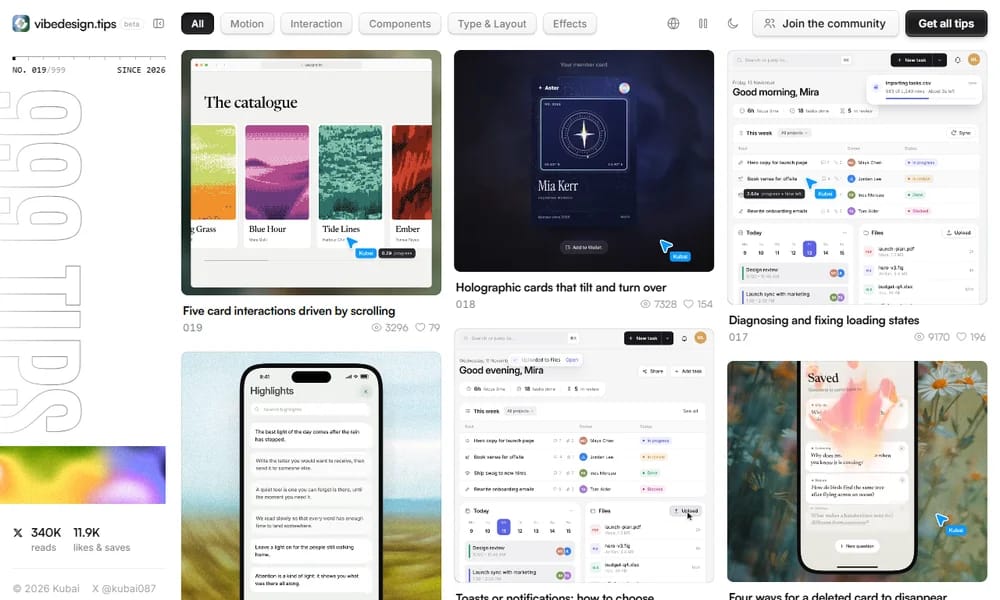
Vibe Design Tips is a growing collection of bite-sized UI/UX design tips — 999 planned, published incrementally under the tagline "Small details that make software feel made". Each tip is a card with a demo image or video; opening it reveals the animation, a summary, detailed notes, and an expandable, copyable code snippet, plus previous and next navigation to binge the whole series. The tips cover the polish layer that separates handmade-feeling software from generic output: motion (choosing easing curves per scenario), interaction (safe areas and delays for cascading menus, drag-to-reorder with element avoidance), components (material and motion for message bubbles, four ways a card can disappear on delete), type and layout (nested and continuous corner radii, CSS typography for mixed Chinese-English text), and effects (liquid glass, holographic cards, shockwave rings, ASCII and dither effects). The most popular tip so far — liquid glass — has collected 29K likes and saves, and the site has passed 340K reads. The name nods to vibe coding culture: the audience is developers shipping fast with AI who lack formal design training but want their software to feel considered. Tips are written to be directly copied into a project. The site is free with no login, supports anonymous saving with export, offers English, Chinese, and Japanese versions, and includes autoplay and dark mode settings.
Best For
Best for developers and vibe coders who want their software to feel designed through small, copyable polish details
Key Features
- 999 planned bite-sized UI/UX design tips
- Each tip with demo image or video
- Detail pages with summary, notes, and copyable code snippets
- Categories: Motion, Interaction, Components, Type & Layout, Effects
- Previous and next navigation to binge the series
- Popular topics like liquid glass, holographic cards, easing curves
- Anonymous save and export without login
- English, Chinese, and Japanese versions
- Autoplay and dark mode settings
Pros
- +Every tip ships with code you can copy straight into a project
- +Focused on the polish layer most tutorials skip
- +Short, bingeable format with video demos
- +Multi-language including Chinese and Japanese
- +Free with no account
Cons
- -Still in beta with only a fraction of 999 tips published
- -Single-author project on a slow publishing cadence
- -Tips are frontend-focused, no design-process guidance
- -No search beyond category filters
/// SPECS
- Pricing:Free
- Platform:Web
- Free, no login required for browsing; anonymous save and export of tips

Linear
Fast, streamlined issue tracking and project management — built for modern product teams
GIMP
The free and open-source image editor — a powerful Photoshop alternative for photo retouching and image composition

Balsamiq
Fast, focused wireframing tool that keeps conversations on structure — not pixels