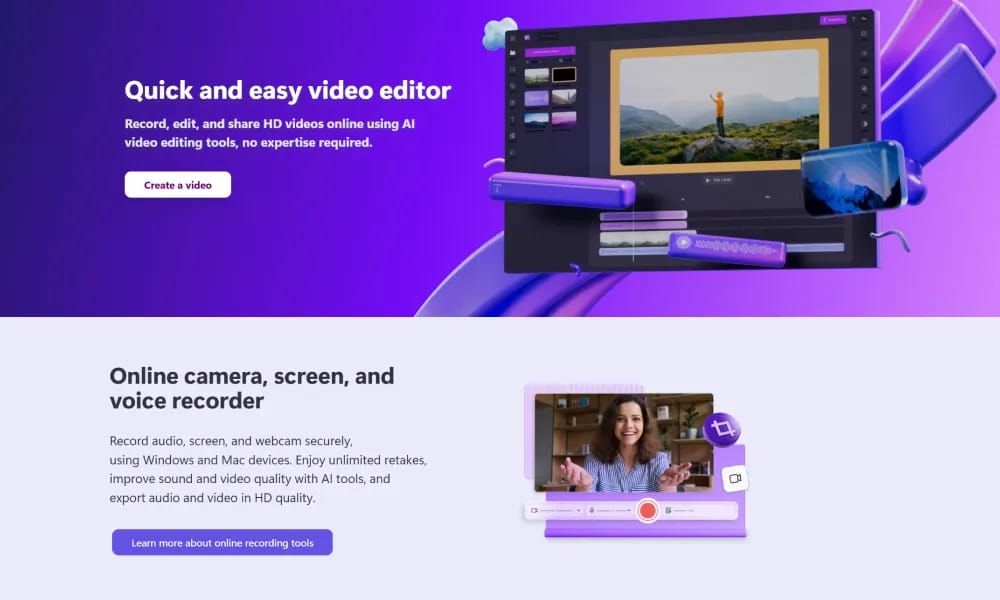
Clipchamp
Microsoft AI video editor for quick social and professional video creation.
Product Overview
Details and main features: Clipchamp (clipchamp.com) is Microsoft's online video editing platform (integrated with Microsoft 365/Teams), combining an intuitive drag-and-drop interface with powerful AI tools to help users easily create high-quality videos; supports screen/camera recording, media import, auto-clipping, AI subtitles generation/translation/styling (multilingual), AI voiceover, text-to-speech, AI background removal, AI image generation, auto highlight clipping, silence/filler word detection & removal, AI video enhancement; features millions of royalty-free stock assets (videos, music, GIFs, templates), text-to-video, green screen/keyframing/animations, transitions/effects/filters, social-optimized exports (TikTok/Reels/Shorts/YouTube); ideal for creators, YouTubers, marketers, educators, brands, and businesses, focusing on speed, collaboration, and pro results. Main features AI tools: Auto subtitles (generate/translate/style), background remover, voice generation, B-roll auto-insert, content highlight extraction. Video editing: Drag-and-drop timeline, multi-track, green screen, keyframes, speed curves, transitions/effects, text/stickers/shapes. Templates & assets: Millions of royalty-free stock, preset templates (memes/ads/YouTube intros), custom brand kits. Collaboration & export: Real-time team editing, comments, version history, HD/4K watermark-free exports (paid), direct social publishing. Other: Image editing, GIF maker, caption burning, batch processing, mobile-friendly.
Best For
Best for Microsoft 365 users, businesses, and educators who need a free, watermark-free video editor with seamless enterprise integration.
Key Features
- Seamless integration with Microsoft 365 and Teams for enterprise workflow compatibility
- AI-powered auto-compose feature that automatically edits raw footage into polished videos with music and transitions
- Built-in screen and camera recorder for creating tutorials, presentations, and demos
- Extensive library of royalty-free stock videos, music tracks, and sound effects
- Multi-track timeline with support for text overlays, filters, transitions, and speed controls
Pros
- +Free version offers 1080p export without watermarks, which is rare among online video editors
- +Deep integration with Microsoft ecosystem makes it ideal for business and education users
- +AI auto-compose dramatically reduces editing time by intelligently selecting best moments
Cons
- -Advanced features like 4K export and premium stock assets require a Microsoft 365 subscription
- -Limited audio editing capabilities compared to dedicated DAW-integrated video editors
/// SPECS
- Pricing:ProFree
- Platform:Browser
- Free tier available, premium features paid

Google AI Studio
Google AI Studio is a free web platform for experimenting with Gemini AI models, offering prompt testing, API tools, and multimodal creation to accelerate AI app development.

Pomelli
Pomelli is Google Labs' free AI marketing experiment that transforms a single website URL into editable, on-brand social media campaigns for SMBs to scale their outreach effortlessly.

Dzine
Dzine.ai is a versatile AI design platform that generates and edits images, videos, and 3D models from prompts or uploads, offering precise tools and free commercial use for efficient creative workflows.

Snappa
Snappa is an intuitive graphic design tool that enables non-designers to create professional social media graphics, blog images, and ads quickly using templates, stock assets, and simple editing features.

Kapwing
Online video editor and AI toolkit for easy social and marketing video creation.

AIEASE
AIEase.ai is a free AI-powered photo editor that automates tasks like object removal, background changes, and headshot generation from selfies, offering unlimited basic edits for quick, professional results.

PicLumen
PicLumen is a free online AI platform that converts text into diverse images and offers editing tools, integrating state-of-the-art models for creators to generate and refine visuals effortlessly.

Wan AI
Wan AI is a free, leading AI video generation platform that transforms text or images into high-quality, cinematic videos with scripts, clips, subtitles, music, and transitions, lowering the creative barrier for filmmakers and creators.
MagicPath
MagicPath.ai is an AI-powered no-code design tool that turns plain-language prompts into high-quality UI prototypes on an infinite canvas, enabling rapid app and website concepting without design expertise.

affinity
Affinity is Canva's relaunched free all-in-one creative suite unifying Designer, Photo, and Publisher into a customizable app with native AI integrations for professional workflows.

Tripo AI
Tripo AI generates 3D models from text, images, or doodles in seconds, with professional geometry and PBR materials for games, printing, and metaverse.

LogoAI
LogoAI generates AI-powered logos and matching brand identities, automating social media content for quick, professional branding.

Grok
Grok.com is xAI's gateway to the Grok AI assistant, offering free and premium access to intelligent models for creative and productive tasks across web and mobile platforms.
Playground
Playground.com is a versatile free AI image generator for creating and editing custom designs like logos and social graphics from text prompts, with premium editing tools for professional results.

Slazzer
Slazzer automatically removes image backgrounds with AI, plus upscaling, enhancement, and relighting for quick professional edits.

Adobe Express
Adobe Express is a free, AI-powered design, photo, and video tool that enables quick creation of on-brand content for teams, enterprises, and students, with seamless integrations and commercial-safe AI features.

Lovart
Lovart.ai is the world's first AI design agent that automates the full design journey from concept to outputs like images, videos, and 3D, enabling creators to bring ideas to life instantly without wait times or limits.

Descript
Descript is an AI-powered video and podcast editor that allows users to edit audio and video by simply typing on a transcript, with tools like Underlord for automated script generation, design application, and visual enhancements to streamline content creation.

OpusClip
OpusClip is the AI video clipping tool that transforms long videos into viral shorts, automates publishing across social platforms, and drives significant growth in views, watch time, and engagement for over 12 million creators and businesses.